 |
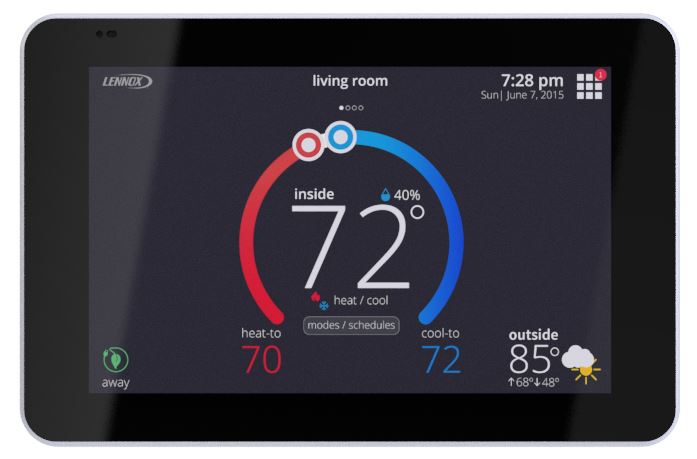
Get More From Your Lennox S30Your Lennox S30 Smart Thermostat does much more than control the temperature in your home. It can help manage your comfort, schedules and humidity, provide remote access from your phone, and even help Alpine Refrigeration identify potential problems with your heating and cooling system. |
Connect Your S30 to Alpine Refrigeration
Give Alpine the Ability to Help — Even Before We Arrive
Your Lennox S30 can notify Alpine Refrigeration when your heating or cooling system detects certain problems and allow us to access important diagnostic information remotely.
By enabling Dealer Support Access, Alpine may be able to identify a problem sooner, remotely troubleshoot certain issues and, when a service visit is necessary, have valuable information about your system before our technician arrives.
There is no charge to enable Dealer Support Access.
How to Enable Alpine Dealer Support
- Wake up the screen and press the Menu button (squares in the upper right corner).
- Go to Settings and select General.
- Select Dealer Info.
- Scroll to the bottom and Tap on Dealer Access
- Toggle on your preferred sharing privileges:
- Remote View: Allows your dealer to view your system status.
- Remote Control: Allows your dealer to remotely troubleshoot and control the system.
- Alerts and Notifications: Sends system warnings and maintenance reminders directly to your dealer.
We recommend enabling all three features to receive the greatest benefit from Alpine’s remote support capabilities.
Prefer to Watch?
Watch this quick video tutorial showing how to enable Dealer Support Access on your Lennox S40.

S30 Help & Programming – LEFT OFF HERE
 📱 Download the Lennox Home App
 📱 Download the Lennox Home App
Control your S30 from your smartphone or tablet. The Lennox Home App allows you to remotely adjust temperatures, manage schedules and access your thermostat when you’re away from home. You will need to set up an account.